# FilDA
filda.io

# GUIDES
FilDA is a decentralized, non-custody, lending protocol on multiple chains. It has been launched on HECO, BSC, Polygon, Arbitrum, IoTex, ESC, and will be deployed on more chains.
**Note**
FiDA is the governance token of Filda Protocol rather than a token with pure investment value
No fund raising, no pre-mine, 100% fair-launch for FilDA token. Devs takes 5% of total token which will be released in blocks over 4 years along with community incentives. The token for the team will be generated from the second week after FilDA is live.
# FilDA Guide for BitTorrent
### ❓How to withdraw assets in BTT chain format from Huobi Exchange to BTTC?
Example: USDT
When you withdraw USDT from Huobi Exchange to your wallet, it will default to USDT\_t on the BTTC network.
#### Overview:
1\. Configure BitTorrent network in your wallet (RPC).
2\. Select the BitTorrent chain on Huobi Exchange to extract assets to your walle.
### Guide:
1\. Click "Settings" of MetaMask to configure the network.
2\. Select the "Network" menu in the settings and add the network manually.
3\. Click "Add Network”.
4\. Enter the BitTorrent chain parameters as per the image.
| Network Name | BitTorrent Chain Mainnet |
| ------------------ | ---------------------------------------------------------- |
| New RPC URL | |
| Chain ID | 199 |
| Symbol | BTT |
| Block Explorer URL | [https://scan.bt.io/](https://scan.bittorrentchain.io/%20) |
5\. After saving the settings you can get your BitTorrent chain wallet address.
6\. On Huobi Exchange, select the asset you want to withdraw, such as USDT, and choose BTT for the withdrawal network.
7\. Enter the amount you want to withdraw, add your Metamask BitTorrent wallet address, and use the BitTorrent network on the withdrawal page to complete the withdrawal.
### ❓ How to bridge assets from Ethereum/BSC network to BitTorrent network?
1.Open the BitTorrent cross-chain bridge() and click to connect to the wallet.
2.Select the network where your assets are.
3.Choose BitTorrent as the network for receiving cross-chain assets.
4.Select the asset you wish to move cross-chain, such as USDT.
5.Enter the amount of the asset you wish to transfer cross-chain.
6.Confirm the receiving address for your asset transfer.
7.Click "Cross-chain" to initiate the cross-chain transfer. Your funds will be available for use on BTTC once the transfer is complete.

# Getting started with FilDA
How to buy FilDA on MDEX and stake in the DAO Governance Pool

**A simple step-by-step guide to getting started on the FilDA platform**
Moving assets to the Huobi Eco Chain (HECO) is a process that requires some preparation and information. This is a new area in DeFi and will likely evolve in time. There is a step-by-step guide at the bottom of this article.
The first requirement is setting up a MetaMask Wallet on your browser. (This is a browser extension — Chrome, Firefox, Edge and Brave are supported).
In order to use the wallet, you will need some Huobi Tokens (HT) in your MetaMask wallet. This is used as ‘gas’ for your transactions. You can acquire this from Huobi, however there is a minimum withdrawal amount (2 HT currently), alternatively have someone send you some.
In MetaMask, set up what is called a custom RPC Network — this sounds complicated, but really it’s just how you switch from one blockchain to the other. In this instance, you will be adding the HECO chain to your wallet, enabling you to make transactions on the chain.
Add Network:
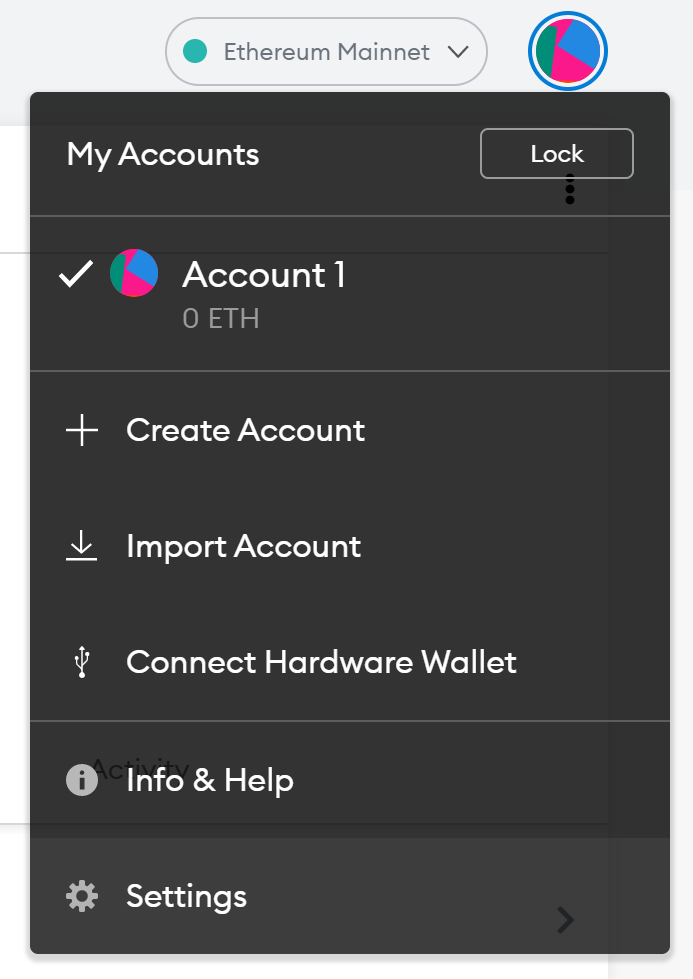
MetaMask Settings:
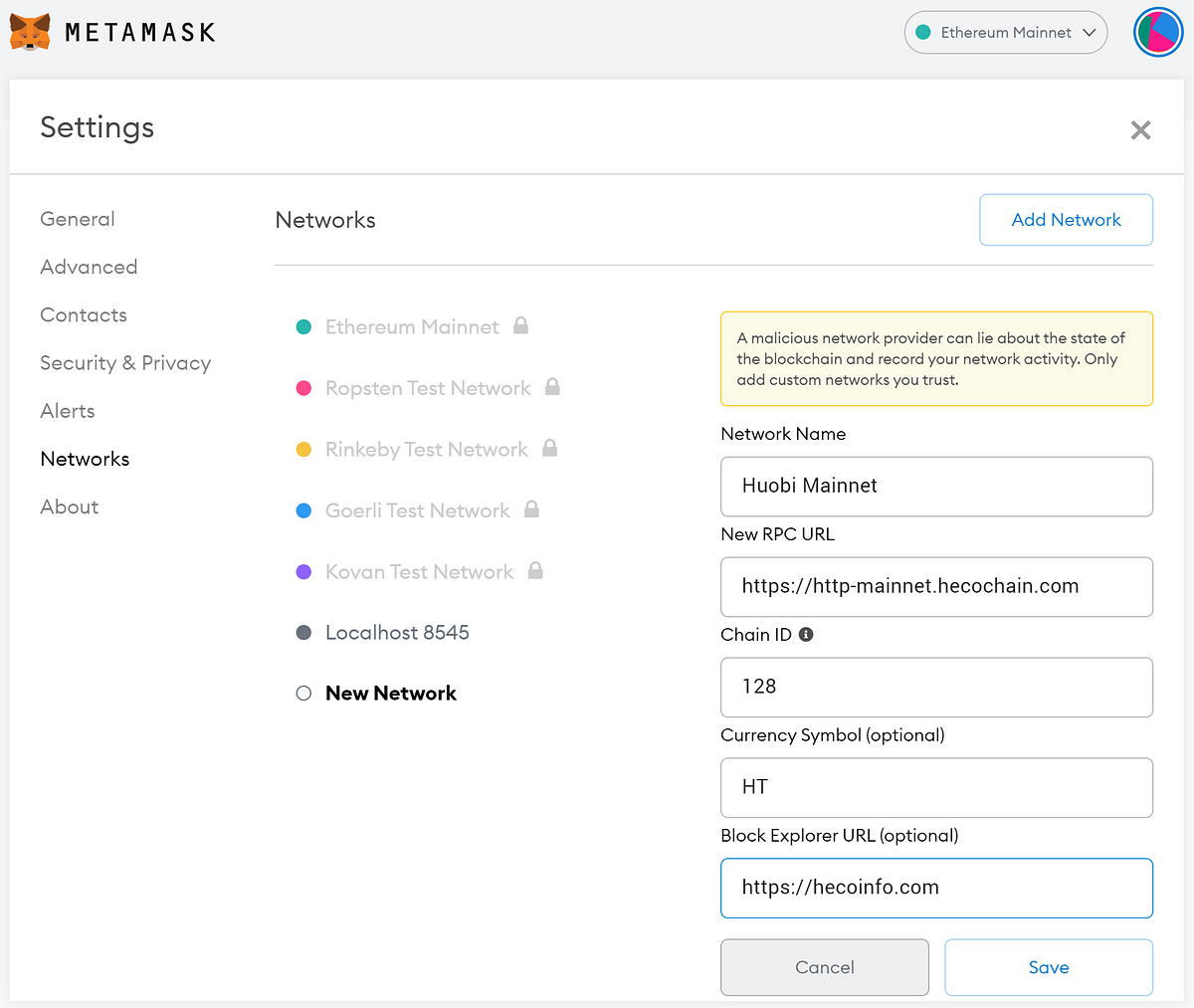
Select Network:
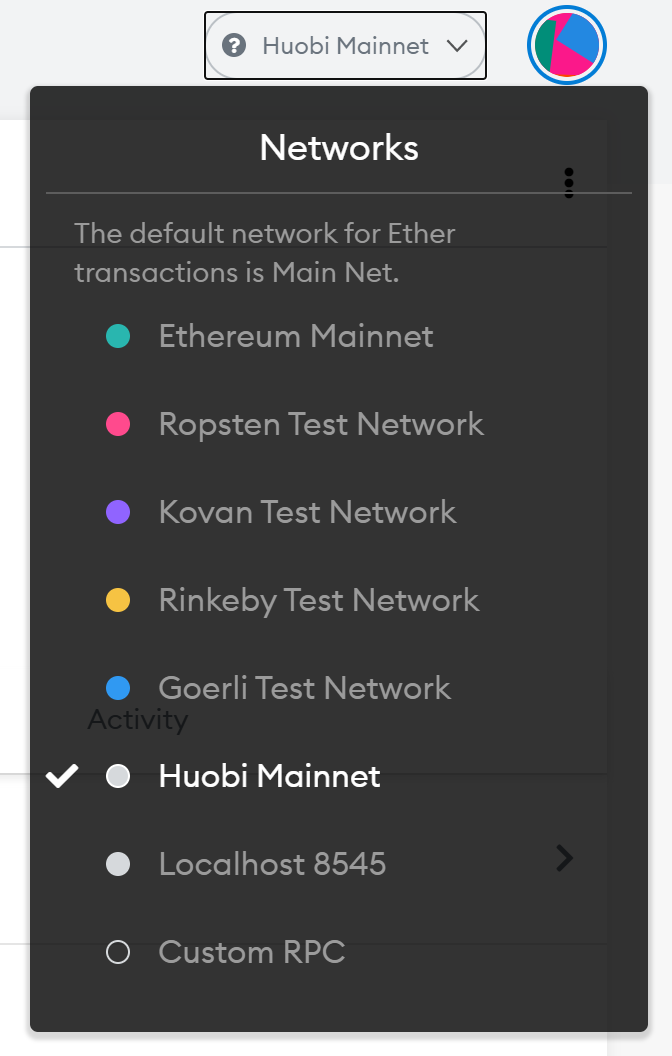
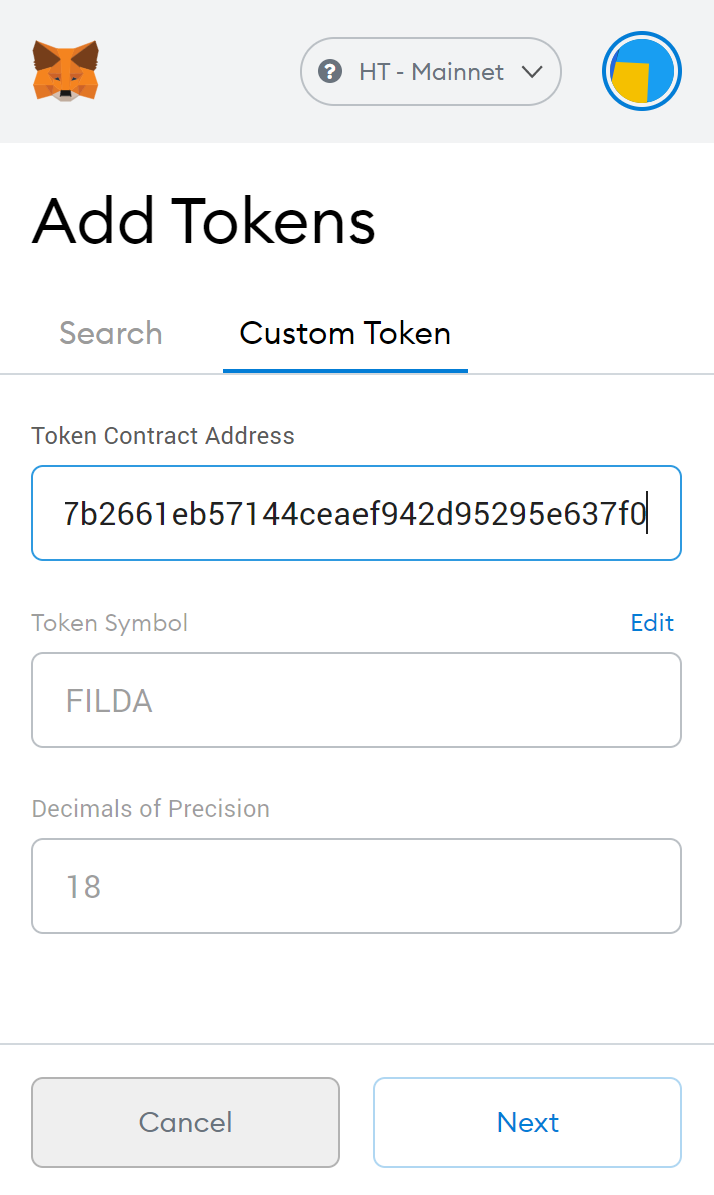
Once added, in order to view FilDA and other HECO assets in your wallet, you will need to add what is called a ‘token contract’. This will let you view your FilDA in the wallet once you have sent it there.
Again, this sounds more complicated than it is, all you have to do is ‘Add Custom Token’ and enter the contract address (0xe36ffd17b2661eb57144ceaef942d95295e637f0) into the field and it will auto-fill the rest for you. It will then automatically add the token ticker to the wallet, enabling you to see your FilDA balance.
Now your MetaMask is ready to receive FilDA, head back to Huobi and deposit your asset of choice, and purchase FilDA on the exchange.
Once you have acquired FilDA, you’re ready to send it to your wallet. At the top of the MetaMask wallet, there is ONE address for everything on Heco.
Add Custom Token:
MetaMask Address:
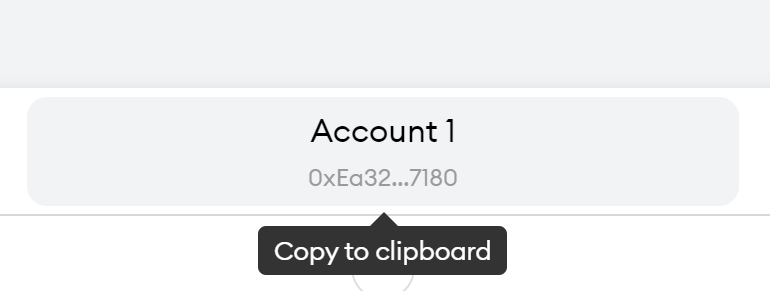
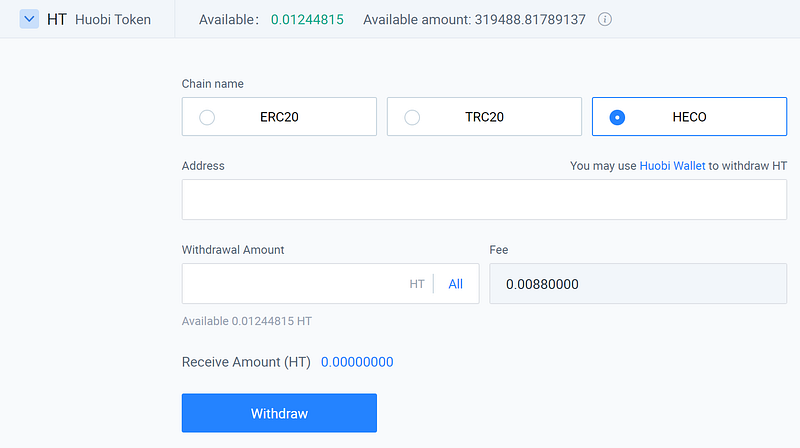
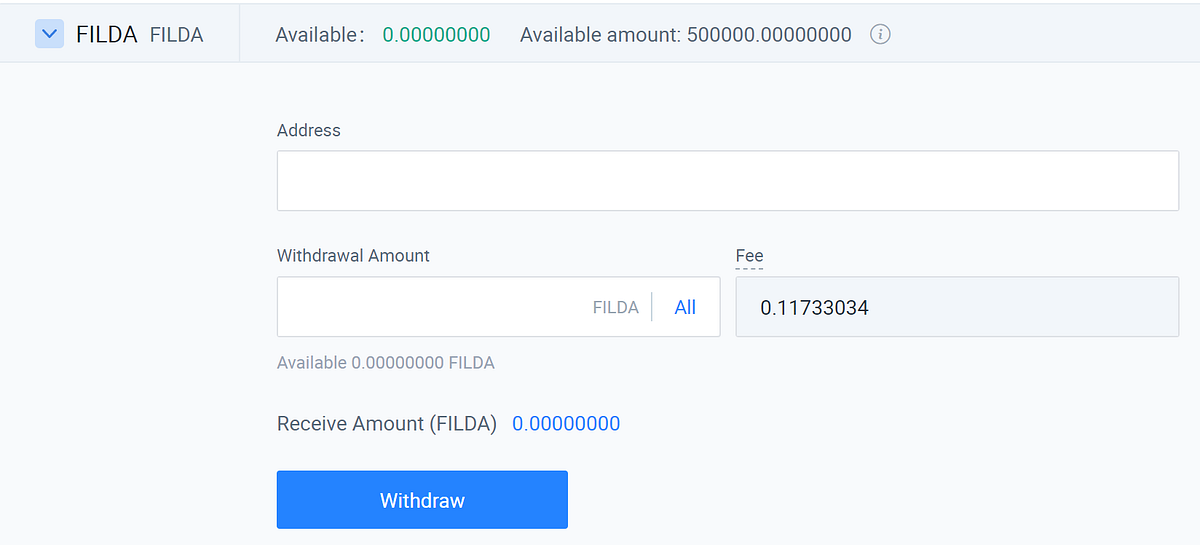
This actually makes it really simple; copy this address and paste it in the withdrawal section of the exchange and you can send your newly acquired FilDA to your MetaMask wallet.
Withdrawing assets from Huobi:

On FilDA.io you can choose where to deposit or stake your funds. To add to the DAO pool, navigate to Staking, find the DAO Pool and deposit your chosen amount of FilDA to start earning FilDA rewards (and HT, HFI and more FilDA!)
Rewards and FilDA DAO pool:
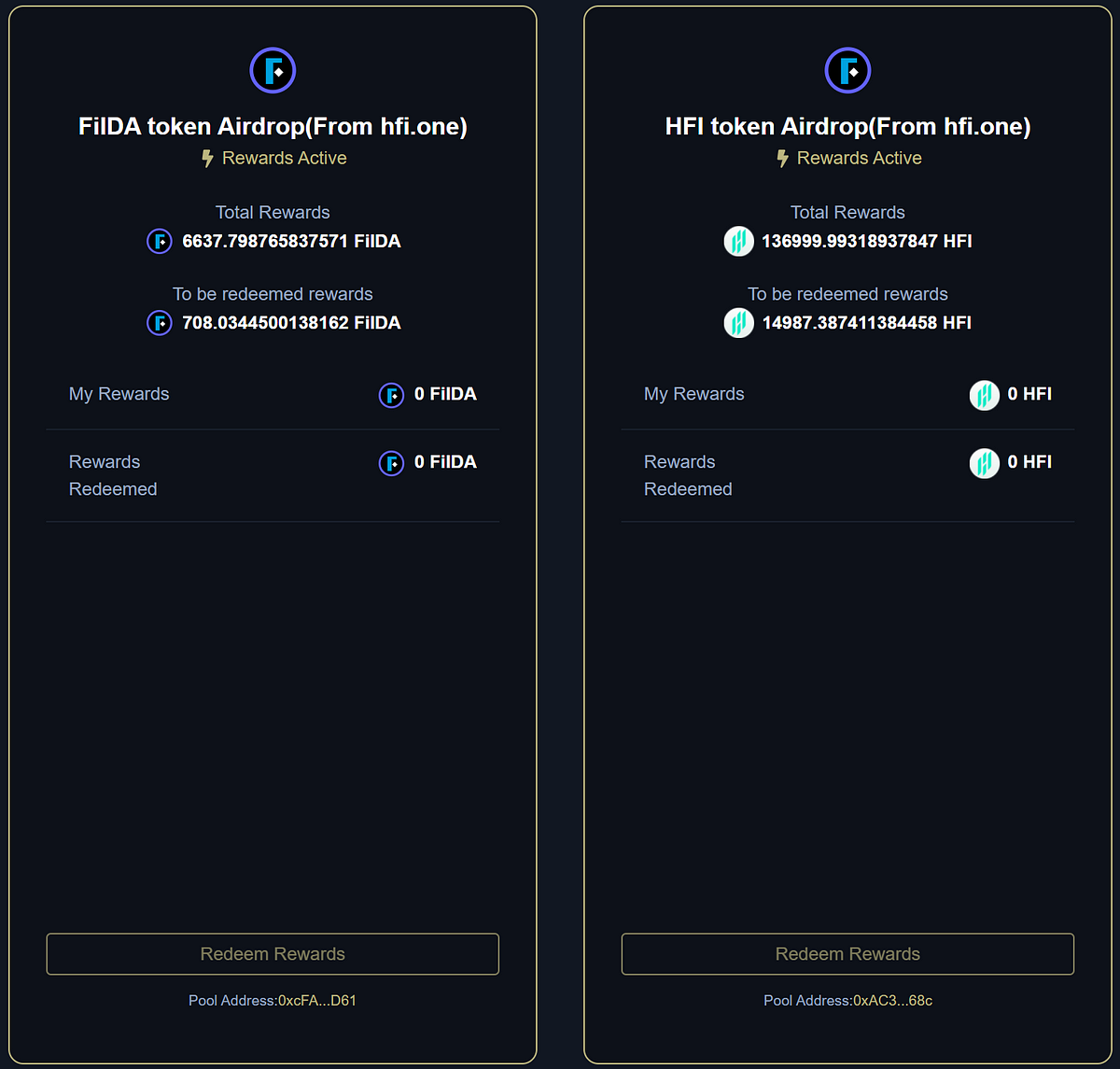
*Please note that the DAO pool has a 3 day lock period where you wait 72 hours for your funds to be transferred from the smart contract back to your wallet. You will not earn any rewards during this 3 day period.*
Welcome to FilDA, DeFi on HECO.
**Step-by-step guide**
**Setting up a MetaMask wallet**
1. Go to [MetaMask.io](http://metamask.io/) and download the extension
2. Create new wallet (write down your seed words and KEEP THEM SAFE)
**Adding Huobi Eco Chain RPC Network (HECO) to MetaMask**
1. Go to MetaMask Settings/Networks
2. Select Add Network
Network Name: Huobi Mainnet
New RPC URL: [https://http-mainnet.hecochain.com](https://http-mainnet.hecochain.com/)
Chain ID: 128
Currency Symbol HT
Block Explorer URL
**Transactions on the HECO chain**
* *If you don’t have any HT in your MetaMask wallet you cannot make transactions on the HECO chain*
* *Sending some HT as well as FilDA means you’ll have ‘gas’ to pay for transactions on FilDA.io/HECO. Ensure you select the HECO option if it is available (sending FilDA doesn’t require this option as it is a HECO asset)*
* *If you don’t have any HT then ask in* [*https://t.me/FilDAcommunity*](https://t.me/FilDAcommunity) *and someone will help you out. (A 0.005HT transfer will cost only 0.000027HT in gas)*
**Sending exchange funds to HECO MetaMask wallet address**
1. Log into your account and purchase FilDA on the exchange
2. Go to the withdrawal page and choose FilDA to transfer
3. Select withdrawal, enter your MetaMask wallet address, and process the withdrawal
**Sending funds to FilDA.io DAO pool**
1. Navigate to [FilDA.io](https://filda.io/) and connect MetaMask wallet
2. Navigate to [Staking](https://filda.io/staking) and select Stake FilDA Token in the FilDA DAO (Lock Period: 3 days)
3. Approve the asset
4. Select how much to stake and process the transaction
**You are now earning FilDA rewards (and HT, HFI and even more FilDA)**
**Resources:**
FilDA Contract address: 0xe36ffd17b2661eb57144ceaef942d95295e637f0
[FilDA.io](https://filda.io/)
[MetaMask.io](http://metamask.io/)[ ](https://gregfilda.gitbook.io/filda-english-preview/v/chinese/technical-documents/risk-control)
# Liquidity Mining
How to stake FilDA pairs in liquidity pools

**Please Note: You must ensure you understand the risks of liquidity mining, including impermanent loss, APR, APY, and potential liquidation risks if you’re using loans.**
Once you have asset tokens you wish to use for mining available in your HECO-compatible wallet, along with some Huobi Token (HT) for gas fees, follow the steps below:
1. Connect your HECO-compatible wallet on FilDA.io
Connecting your wallet

2\. Choose a mining poolFilDA.io Staking page

3\. Decide your total staking amount in USD
4\. Go to: MDEX.com and navigate to the “Swap” tabSwapping tokens using MDEX
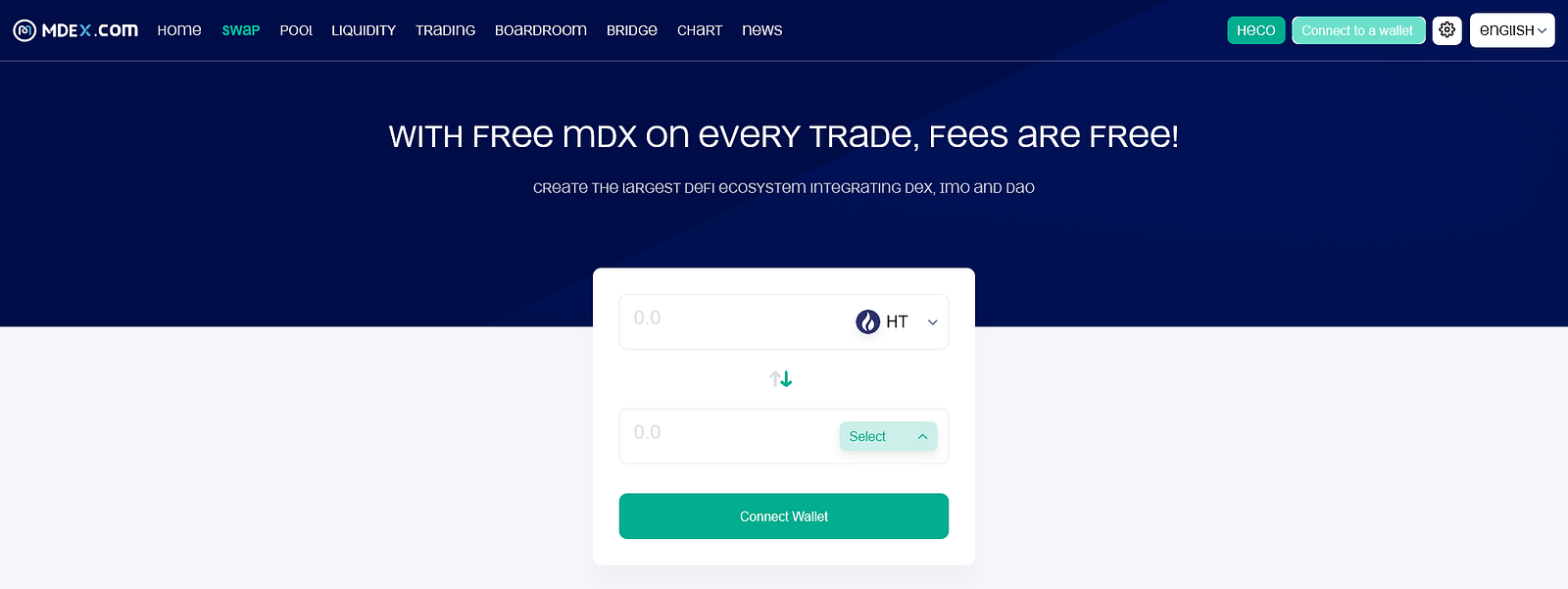
5\. Calculate and enter a 50/50 split of the total value in USD between your assets for the pool
6\. Once assets are split 50/50 (USD value) go to: MDEX.com, navigate to the “Pool” tab, and select “Add Liquidity” — select your two assets and the quantity required in one, the other will auto-populateAdding liquidity using MDEX

(This is where you acquire your LP tokens)
7\. Go to FilDA.io, ensure you're connected to your HECO-compatible wallet, and you will now see you have LP tokens ready for the mining pool for your asset pairStaking LP tokens

Choosing the amount

8\. Click on “Stake”, enter the quantity you wish to stake, and confirm the transactionProcessing the transaction

*Once the transaction is confirmed, liquidity is added to the pool and you are successfully mining.*[ ](https://gregfilda.gitbook.io/filda-english-preview/v/chinese/guides-1/getting-started-with-filda)
# ELA User started with FilDA
[FilDA](http://filda.io/) is now fully live, and all users are welcome to begin exploring its suite of preliminary financial services. Nonetheless, it is strongly recommended to first read through the instructions below before engaging the platform. Within a few minutes, you’ll be fully informed and prepared to begin staking and borrowing on the FilDA platform.
### Instructions Before Using FilDA
First, transfer ELA from the Mainchain to Eth Sidechain
Option 1: If you use Elephant Wallet, ELA Wallet or elastOS Wallet, enter “cross” in the destination address, then input the amount of ELA to be transfered, and enter “toesc\” (e.g: toesc0x000000000000) in memo to complete the transfer.
Option 2: You can also use the Mini Program in Elephant Wallet. Here is the link:
Option 3: Use elastOS wallet to transfer to ETH sidechain.
Next, create a MetaMask wallet and deploy both Huobi Mainnet and ELA Sidechain
* Visit [metamask.io](http://metamask.io/),download and install Metamask and then create a wallet
* Select “Custom RPC” in the “Network” tab of Metamask,
* Set up the Huobi Mainnet using the custom RPC parameters as follows: RPC URL: [https://http-mainnet.hecochain.com](https://http-mainnet.hecochain.com/)
* ChainID:128
* Explorer:[https://scan.hecochain.com](https://scan.hecochain.com/)
*  Set up ELA Sidechain using the custom RPC parameters as follows:
* RPC URL:
* ChainID:20
* Explorer:
*  Import the wallet private key
Then, transfer ELA from Eth sidechain to Heco chain
Tools:
Instructions:
1\. Start the Metamask;
2\. Click on the upper right corner to switch to “Heco-Elastos“

 3. Transfer ELA from Eth sidechain to HECO
 4. After the transfer is successful, you can switch to Huobi Network in your wallet to check the balance

Note: If you need to add tokens to the Huobi network in the wallet, here are the steps: Wallet-Add Tokens-Custom Tokens-Token Contact Address
5\. Address list:
###   How To Use Filda
Visit [filda.io](http://filda.io/), and connect to the MetaMask wallet and then switch to the Huobi Mainnet. You can start to use Filda Lending.
How To Stake Your Token
* Visit [filda.io](http://filda.io/) and you can scroll down to the “market” section and deposit FIL, HT, HUSD or ELA into FilDA, or lend them to the borrowers on the platform.
*  Deposit ELA, HT, HUSD, or hFIL into FilDA and you can get fTokens. fTokens can be directly exchanged to other tokens through TokSwap.
Tips for token deposit:
1\. ELA: transfer ELA from the main chain wallet to Eth Sidehain, and then to the Heco chain through tokbridge.net.
2\. HUSD, FIL: transfer them from the Huobi App to the HRC20 address.
3\. HT: transfer them from the Huobi App to the HECO address.
4\. You will need HT tokens to use FilDA on HECO, these can be acquired on Huobi.
##
# Video Guides
{% embed url="" %}
{% embed url="" %}
# IoTex Guide(Cross-chain/
**· IoTex Cross-chain Guide: Iotube**
Use ioTube to cross-link from the Ethereum/Matic/BSC networks to the IoTex network
1. Log in or create a Metamask account
2. Switch the wallet network to the Ethereum/Polygon(Matic)/BSC network
3. Open and connect the ioTube dApp:
4. Click Connect Wallet to allow ioTube to connect to your Metamask wallet
.png?alt=media\&token=e2a9e6ff-e685-4356-b7c8-712e44c5632a)
**5.**Click here to select the assets you want to transfer cross-chain, and then enter your wallet address. IoTube currently supports a variety of ERC20 assets including ETH, wBTC, BUSD, PAXG, and more.
.png?alt=media\&token=2c91b265-3ec7-48de-84ee-eb19c72e75c8)
Note: The target wallet address can be unlocked on the target blockchain using the same private key as the sender wallet address. Or click on the wallet location, where you can enter the receiving address.
.png?alt=media\&token=9f760c0d-ebe2-42de-a8ed-96e14d2ac019)
6.Then click "Deposit", confirm the cross-chain information, and click "Confirm".
7\. The process from BSC chain and Polygon chain to IoTeX chain is the same. Each chain opens the wallet url, . Then select the corresponding chain to IoTeX.
Note: ioTube currently supports bidirectional token exchange between IoTeX, Ethereum, Binance Smart Chain and Polygon! To cross to IoTeX from other chains, you need to transfer assets to Ethereum, BSC, and Polygon chains first.
**·IoTex Cross-chain Guide: ElkNet Bridge**
ElkNet cross-chain bridge allows transfers of ELK 1:1 between every chain Elk supports.
This guide will show you how to use ElkNet.
**1.**Go to with your wallet (Metamask, etc) already connected to the chain you want to transfer ELK from. When you connect in the Elk dApp, it will automatically adjust to the chain you're on and the token list will change.
\[Note: if you need to add a new chain to your wallet, you can search for the chain at and add it with one click]
2.Swap tokens you'd like to transfer for the ELK token using the “Swap” tab
3.Click on the “ElkNet” tab (or visit ) and input the amount of ELK you would like to send. Then select the destination chain from the drop-down menu, and choose whether or not you'd like to convert one ELK for gas.
\[Note: Make sure you choose the “Swap $ELK 1 for gas” if you are transferring to a new chain where you do not have any of the native gas token. ElkNet automatically converts some of your ELK to gas so you can make transactions when you arrive)

4.Approve ELK, and Transfer. That’s it!
\[Note: you can watch the progress of your transfer by scrolling down to the ElkNet transaction history. Transfers advance from “Initiating” to “Processing” to “Complete.” When the transfer is complete, connect your wallet to the destination chain and refresh the Elk dApp to see your ELK.]

## Connect Metamask to the IoTeX Network
You can use both the Metamask browser plugin or the Metamask mobile app if you want. Here, we will show the instructions for the browser plugin: for the mobile app, the configuration is very similar.
### 1. Add a custom RPC/Network
In the Metamask browser extension, open the "**Networks**" drop-down menu at the top, and choose the "**Custom RPC**" menu item:

### 2. Mainnet configuration
Input the respective network values for IoTeX Mainnet.

Nome Rete: IoTeX Mainnet
Nuovo RPC URL:
Chain ID: 4689
Currency Symbol: IOTX
Explorer UR:
### 3. Save and select the IoTeX network
Click the **`Save`** button and make sure **IoTeX** is selected as the active network.
# Elastos Smart Chain (ESC) Guide
**Wallet connection**
1.Configure the ESC network on MetaMask
· Log in MetaMask, click Network, and select "Add Network".

·Put the following parameters in the corresponding boxes
*Network Name: ESC*
\_New RPC URL: ;
*Chain ID: 20*
*Blockchain Explorer URL: *

2.Keep some ELA in your wallet Do not swap all the ELA in your wallet in any one transaction, as all transactions require ELA for a gas fees.
**Deposits and loans**
1. Log in to the FilDA website
;
;
2.Connect the ESC wallet
Remember to switch your MetaMask to the ESC main network.

3.Select assets
The supported assets include ELA, BUSD\_b, HUSD, ETH, BTC, and USDC.

4.Deposit mining
Take deposit ELA as an example, click "Deposit", pop out the deposit page, select the amount to deposit, confirm the error, click "Deposit".

**5.Stake mining**
Staking supports FilDA and enables Elastos ecological project assets such as Glide, MTRL, and ELK to receive ESC FILDA tokens. Take Glide Stake as an example, click "STAKE GLIDE TOKEN" to Stake for the first time, and then enter the amount to Stake.

**6.Stake LP Token**
Currently, FilDA supports FilDA-ELA liquidity mining.
· First of all, we need to go to GLIDE to pledge the token and add liquidity.
\_\*\*GLIDE website: ;
· If you are providing liquidity in Glide Finance for the first time, you will need authorized wallet approval to begin the process. Click Enable, and, when approved, Glide Finance can process the Filda-ELA smart contract to provide liquidity.
· When finished, click the "+" icon.
· You will see a pop-up where you can specify how much Filda-ELA you wish to stake.

· When you decide, click "Supply" to complete the operation.
Note: Adding liquidity is not without risk, there is risk of impermanent loss. Be sure to note whether the current/expected future price of the two tokens is acceptable to you.
· Return to the stake mining page of FilDA. Here, you can see how many LP tokens are in the wallet balance.
· Click the option to stake LP token and wait for mining earnings to appear after confirmation.

**Elastos Smart Chain Cross-chain Guide**
*Note: ShadowToken currently supports cross-chain from HECO, BSC, ETH chain to Elastos.*
Below is an example of cross-chain asset transfer from Ethereum to Elastos.
**·Transfer ELA from Elastos to Ethereum**
1.Visit . Connect your web3 wallet (MetaMask or a WalletConnect compatible wallet that supports custom networks) to the Elastos network. Once connected, you will see your address populated in the header and your ELA balance displayed by the 'Max' button.
You will notice two separate fields, the top one representing assets on the source network (Elastos), and the bottom one representing assets on the destination network (Ethereum).

There are also icons labeled 'Lock', 'Release', 'Burn', and 'Mint'. These will change depending on which asset you select. In this case, ELA will be locked on the Elastos chain and its "shadow token" (ELA on Ethereum) will be minted on the Ethereum chain at a 1:1 ratio, as governed by the mediator smart contracts. When transferred back, the ELA on Ethereum shadow token will be burned and native ELA will be released to your address on the Elastos sidechain. This same principle applies to all asset transfers.

2.To proceed, enter the amount of ELA you wish to transfer to Ethereum. The minimum transfer is 1 ELA. Note that ELA functions as gas on the Elastos sidechain, so reserve some to pay the small transaction fees. When you enter a valid balance, the 'Next' button should activate. Click it.
*Note: The destination address field is optional. This is for when you wish to bridge assets to an address other than the one you are already connected to. In most cases, this field can be skipped.*

3.Next, you will be directed to a confirmation page. Ensure the details are correct and click 'Confirm'.
*Note: Bridge mediator fees are presently only charged for ELA and ETH transfers on the return trip and are set at 0.1%.*

*4.*You should now be prompted to authorize the contract interaction in your wallet. The default gas price is fine and does not need to be changed, though you can increase it if you want a faster transaction. Confirm the transaction in your wallet.
*Note: When transferring ELA and ETH, you do not need to approve an allowance. However, for ERC-20 tokens there will first be a spend authorization request to permit the smart contract to retrieve funds from the token contract, and then a second request for the actual bridge transfer.*

*5.*The interface will now display the transfer progress, which includes waiting for block confirmations on the source network and for the bridge oracles to validate the transaction and mint or release your assets on the destination chain. Once complete, the success message will pop up with a link to view the confirmed transaction on the destination chain's block explorer.
*Note: In some cases, the transfer may take longer than expected (>5 minutes) due to the fixed gas prices used by the bridge mediator. If this happens, please monitor the block explorer link provided. Your funds are safe and will eventually arrive.*

**Send ELA from Ethereum back to Elastos**
You should now have some ELA in your wallet on the Ethereum chain. Switch your network in MetaMask to the Ethereum mainnet. The app should update to reflect your new balances on the chosen network.

To see the ELA that you minted on Ethereum, click the 'ETH' dropdown menu to open the default token list and select ELA.
*Note: You can also view the opposite bridge direction by clicking the swap icon in the middle, but you will need to switch your network before beginning a transfer. It will not auto-connect your wallet to the proper network.*

*Note: This is also where you can add custom tokens by pasting the token contract address in the search field.*
To return your ELA on Ethereum back to the Elastos Smart Contract chain, simply repeat the same process as above. You will now be burning the ELA token on Ethereum, and releasing your original ELA back to your account. Keep in mind that gas fees will be much higher when initiating a transfer from the Ethereum chain (and more confirmations are required), so plan accordingly.

**How to transfer ELA to Elastos Smart Chain from Elastos Mainchain**
1.Open Elastos Essentials, switch to Elastos Network, select the main chain ELA and click "Transactions & Transfers".

2\. Go to the following page and choose “TRANSFER”.

3\. Input the recharge amount, confirm the information, click "Recharge", and wait for the recharge to complete.

# FilDA Guide for REI
### **· Wallet connection**
1.Configure the REI network on MetaMask
·Log in to MetaMask, click Network, and select "Add Network".
.png?alt=media\&token=6be51893-9e51-4538-a6e6-d1cf3aea1251)
·Put the following parameters in the corresponding boxes:
***Network Name: REI Network***
\_\*\*RPC URL: ;
***ChainID: 47805 Symbol:***
***REI Decimals: 18***
***Explorer: ***
.png?alt=media\&token=c60217cb-a16d-4fd2-8f8d-0f84b6fd2173)
2\. Keep some REI in your wallet. Do not swap all the REI in your wallet in any one transaction, as all transactions require REI for gas fees.
### **·Deposits and loans**
**1.Log in to the FilDA website**
;
;
;
**2.Connect the REI wallet**
Remember to switch your MetaMask to the REI main network.
.png?alt=media\&token=1dc9ce49-5e10-44b7-9b74-64d4def0498c)
**3.Select assets**
The supported assets include REI、USDT、USDC、BTC、ETH and BUSD.

**4.Deposit mining**
Example: Deposit REI
·Click "Deposit"
·Select the amount to deposit
·Click "Deposit"
(The first time you deposit you will need to approve the contract for depositing each asset.)
.png?alt=media\&token=9be8f77b-4454-42e4-b941-ca72b433e32c)
**5.Borrowing**
Before borrowing, you need to deposit assets to FilDA. Please refer to the deposit procedure (Step 4).
·After you finish depositing, click “SAVINGS”.
·Click “COLLATERAL” to enable borrowing against your assets.
.png?alt=media\&token=65da2adb-807a-4821-a1f9-532f99910df0)
·Select assets you want to borrow and click the“Borrow“button.
Take REI as an example:
.png?alt=media\&token=34f18923-d260-4ab8-867a-ab8bd6b47c51)
·Enter the amount you want to borrow. Before you click ‘Borrow’, please confirm the relevant information.
.png?alt=media\&token=a9722558-97ec-4e15-a8d1-143e69540db9)
6.When you have finished depositing and borrowing, you can see the data for your position here:
.png?alt=media\&token=ca49a217-b853-4205-8f9e-18b00a369806)
# REI Network Guide(Cross-chain/
### Cross-chain path of each asset:

### **CBridge Guide**
[**https://cbridge.celer.network/#/transfer**](https://cbridge.celer.network/#/transfer)
1.Connect Your Wallet
Before you explore the different features offered by cBridge, you will need to connect your wallet.
Click "Connect Wallet", and you will be prompted to select a wallet. (This tutorial will use MetaMask as an example wallet.)


2.Select MetaMask
You should now see your wallet address and your current chain in the top right corner of the page.


3.Transfer tokens cross chain
If you want to transfer BUSD from the BNB Chain to REI Network, the steps are simple for cBridge:
·Select "BNB Chain" in the dropbox next to "From" and "REI Network" in the dropbox next to "To".

*Note: You will be prompted to switch your wallet to BNB Chain if it's not already connected.*
·Enter the amount you want to send under "Send". You should see the estimated amount you will receive under "Receive (estimated)".
*Note: There will be a difference between the amount you send and the amount you receive. This is determined by the Bridge Rate and Fees. For the exact definition of each item in the transaction, check the tooltips next to each of the terms.*
·Review your transfer details and click "Transfer" to transfer the assets across the chains.

4.Wait
It takes some extra time for the funds to arrive at your wallet on the destination chain.
### **Multichain Guide**
[**https://app.multichain.org/#/router**](https://app.multichain.org/#/router)
1.Connect Your Wallet
Before you explore the different features offered by Multichain, you will need to connect your wallet.
Click "Connect Wallet", and you will be prompted to select a wallet. (This tutorial will use MetaMask as an example wallet.)

2.Connected to MetaMask
After the connection is complete, you will see your wallet address in the upper right corner.

3.Transfer Tokens Across Chains
*Note: Currently, Multichain only supports cross-chain from ETH to REI Network. Example: Moving USDT from ETH chain to REI Network.*
·In the figure below, select "Ethereum" for "1" and "REI" for "2".

2.After the chain selection is completed, select the asset (USDT) that you want to send across the chain, and then enter the amount you want to send under "Send", the estimated amount will appear under "to".

*Note: Currently, the minimum cross-chain amount set by Multichain is 40 USDT, and the maximum cross-chain amount is 5,000,000 USDT. The estimated cross-chain arrival time is 10-30 minutes, and the large cross-chain arrival time above 1,000,000 USDT is 12 hours.*
·After confirming the cross-chain amount and related information, click "Swap" to complete the cross-chain operation.
# Audits
{% file src="/files/t96OI0MUoNnSCIByDewB" %}
{% file src="/files/rbzw2jyHzPAUDa6kKbf1" %}
{% file src="/files/KSYCB1ix0OQwIqQblv2r" %}
{% file src="/files/ExT7rf1YsSHEcm0TQvRU" %}
# FilDA Data
FilDA Weekly data updates 👇
# FilDA Update - July 7,2023
# FilDA Update - June 30,2023
# FilDA Update - June 25,2023
# FilDA Update - June 16,2023
# FilDA Update - June 9,2023
# FilDA Update - June 2,2023
# FilDA Update - May 26,2023
# FilDA Update - May 19,2023
# FilDA Update - May 12,2023
# FilDA Update - May 5,2023
# FilDA Update - April 28,2023
# FilDA Update - April 14,2023
# FilDA Update - April 7,2023
# FilDA Update - March 31,2023
# FilDA Update - March 24,2023
# FilDA Update - March 17,2023
# FilDA Update - March 10,2023
# FilDA Update - March 3,2023
# FilDA Update - February 17,2023
# FilDA Update - February 10,2023
# FilDA Update - February 3,2023
# FilDA Update - January 27,2023
# FilDA Update - January 20,2023
# FilDA Update - January 13,2023
# FilDA Update - January 6,2023
# FilDA Update - December 30
# FilDA Update - December 23
# FilDA Update - December 16
# FilDA Update - December 9
# FilDA Update - December 2
# FilDA Update - November 25
# FilDA Update - November 18
# FilDA Update - November 11
# FilDA Update - November 4
# FilDA Update - October 28
# FilDA Update - October 21
# FilDA Update - October 14
# FilDA Update - October 8
# FilDA Update -September 30
# FilDA Update -September 23
# FilDA Update -September 16
# FilDA Update -September 9
# FilDA Update -September 2
# FilDA Update -August 26
# FilDA Update -August 19
# FilDA Update -August 12
# FilDA Update -August 5
# FilDA Update -July 29

# FilDA Update -July 22
.png?alt=media\&token=0d2600ae-905b-4bdf-b26a-af91c2f2fa9e)
# FilDA Update -July 17

# FilDA Update -July 8

# FilDA Update -June 17

# FilDA Update -June 10

# FilDA Update -May 27

# FilDA Update -May 20

# FilDA Update -May 13

# FilDA Update -May 7

# FilDA Update -May 5

# FilDA Update -April 1

# FilDA Update -March 25

# FilDA Update -March 18
.jpg?alt=media\&token=3532042d-d436-4e27-9c25-7bb5538cc9d5)
# FilDA Update -March 11

# FilDA Update -March 4

# FilDA Report
# FilDA Finance Update - December 2022
1\. Prepare to deploy FilDA on the Tron network.
2\. Fixed the bug that FilDA failed to withdraw BUSD under the REI network.
###
### FilDA Supply On The page Product Data:
Total deposits and loans:$16,157,557.62
Current FilDA circulation: 200,427,207 FilDA
DAO pool pledge amount: 57,096,427.18 FilDA
($138,310.58)
Number of current addresses: 145,460
CMC market cap rank: 3079
Coingecko Market Cap Rank:2266
In November, the loan agreement interest income for users (USDT):
IoTeX :31,389.66
HECO :12,951.23
E S C :8,745.75
### Operational Dynamics:
On December 15, the mining speed of asset lending on the FiLDA-ESC chain was reduced by 20% again.
# FilDA Finance Update - November 2022
1\. Complete the audit of veFilDA
2\. Fixed the compatibility issue of FilDA webpage Walletconnect
3\. Solve the problems related to FilDA website connection wallet and disconnection and reconnection
### FilDA Supply On The page Product Data:
Total deposits and loans:$24,606,194.78
Current FilDA circulation: 198,241,564 FilDA
DAO pool pledge amount: 65,741,635.85 FilDA
( $190,414.34)
Number of current addresses: 145,453
CMC market cap rank: 2684
Coingecko Market Cap Rank:2162
In August, the loan agreement interest income for users (USDT):
IoTeX: 54,505.52
HECO: 24,649.52
IoTeX : 4,115.34
### Operational Dynamics:
1\. On October 28, FilDA announced that in view of the fact that Huobi Global has stopped the stable currency HUSD service, FilDA will adjust the pledge rate of HUSD on the platform HECO chain and ESC chain.
2\. Recently, with the decoupling of HUSD, FilDA has also decreased. Therefore, the FilDA platform removes liquidity from HUSD and pairs it with USDT after the timelock expires.
# FilDA Finance Update - October 2022
### FilDA Operational Monthly Report
1\. Complete the audit of veFilDA
2\. Fixed the compatibility issue of FilDA webpage Walletconnect
3\. Solve the problems related to FilDA website connection wallet and disconnection and reconnection
### FilDA Supply On The page Product Data:
Total deposits and loans:$24,606,194.78
Current FilDA circulation: 198,241,564 FilDA
DAO pool pledge amount: 65,741,635.85 FilDA
( $190,414.34)
Number of current addresses: 145,453
CMC market cap rank: 2684
Coingecko Market Cap Rank:2162
In August, the loan agreement interest income for users (USDT):
IoTeX: 54,505.52
HECO: 24,649.52
IoTeX : 4,115.34
### Operational Dynamics:
1\. On October 28, FilDA announced that in view of the fact that Huobi Global has stopped the stable currency HUSD service, FilDA will adjust the pledge rate of HUSD on the platform HECO chain and ESC chain.
2\. Recently, with the decoupling of HUSD, FilDA has also decreased. Therefore, the FilDA platform removes liquidity from HUSD and pairs it with USDT after the timelock expires.
# FilDA Finance Update - September 2022
### FilDA Operational Monthly Report
1\. Improve and revise the Wallet Connect connection method of FilDA website
2\. Added link button for asset details on FilDA page
3\. Fixed the problem of displaying data on FilDA clearing page
###
### FilDA Supply On The page Product Data:
Total deposits and loans:$26,713,578.15
Number of current addresses: 145,606
Current FilDA circulation: 193,384,768 FilDA
DAO pool pledge amount: 64,632,411.60 FilDA
( $ 408,240.17)
CMC market cap rank: 2678
Coingecko Market Cap Rank:1834
In August, the loan agreement interest income for users (USDT):
IoTeX: 43,254.76
HECO: 16,125.38
IoTeX: 43,254.76
### Operational Dynamics:
1\. On September 13, FilDA tweeted: Ethereum’s merger transition will not affect the operation of the FilDA system and its services (including lending and clearing).
2\. On September 24, according to the design of the FilDA economic model, the mining speed of asset lending and staking on the loTeX chain will be reduced
Half. At the same time, the daily output of FilDA is also halved accordingly.
# FilDA Finance Update - August 2022
1\. Changed HUSD to USDT as the FilDA page display pricing basis.
2\. Develop and optimize the FilDA DAO upgrade contract and related pages.
3\. Scan and clean FilDA historical cache data.
### FilDA Supply On The page Product Data:
Total deposits and loans:$25,961,252.93
Number of current addresses: 145,379
Current FilDA circulation: 191,324,911 FilDA
DAO pool pledge amount: 71,882,962.39 FilDA
($ 291,704.83)
CMC market cap rank: 3010
Coingecko Market Cap Rank:2049
In August, the loan agreement interest income for users (USDT):
HECO: 41,421.72
IoTeX: 60,315.54
ESC: 6,920.69
### Operational Dynamics:
1.On August 10th, the HECO chain destroyed 180,000,000 FilDA for the fourth time. So far, the HECO chain has destroyed a total of 25,000,000 FilDA.
2.Recently, FilDA tweeted: The transition of the Ethereum merger will not affect the operation of the FilDA’s system and its services (including lending and liquidation).
# FilDA Finance Update - July 2022
1\. Update the information on the FilDA website page and add cross-chain bridge links.
2\. Upgrade each chain RPC node to improve node network access speed.
3\. Develop a new DAO governance page to prepare for veFilDA.
### FilDA Product Data:
Total deposits and loans: $32,357,281.72
Number of current addresses: 145,354
Current FilDA circulation: 188,241,344 FILDA
DAO pool pledge amount: 73,761,296.09 FILDA ($398,109.07)
CMC market cap rank: 3213
Coingecko Market Cap Rank: 1998
In June, the loan agreement interest income for users (USDT):
HECO: 45,151.95
IoTeX: 55,598.32
ESC: 6,371.81
### Operational Dynamics:
1.1st July, FilDA officially launched REI Network, enabling asset lending services such as REI, USDT, USDC, BTC, ETH, and BUSD.
2.Recently, the HECO chain has destroyed 180,000,000 FilDA for the 4th time. Thus far, a total of 250,000,000 FilDA has been destroyed on HECO Chain.
# FilDA Finance Update - June 2022
1\. Optimize functions such as wallet connection and network switching.
2\. FilDA goes online on REI Network.
3\. Added language support for Korean on FilDA.
4\. Open the FilDA DAO proposal and prepare for FilDA production reduction and cross-chain.
### FilDA Supply On The page Product Data:
Total deposits and loans:$29,429,498.16
Number of current addresses: 145,328
Current FilDA circulation: 192,070,823 FilDA
DAO pool pledge amount: 70,298,287.32 FilDA
( $ 399,407.28)
CMC market cap rank: 2997
Coingecko Market Cap Rank: 1907
In June, the loan agreement interest income for users (USDT):
HECO: 41,421.72
IoTeX: 60,315.54
ESC: 6,920.69
### Operational Dynamics:
1.On June 7th, FilDA and ONTO held an online AMA. The best questions on Twitter and the AMA site shared 𝟓𝟎𝟎 FILDA.
2.On June 9th, $FILDA (HECO) was listed on the Bit.Store app.
3.On June 15th, FilDA and REI Network held an online AMA. Following and retweeting gave participants the chance to share 1000 FILDA. Joining the Telegram group allowed participants in the AMA the chance to win 𝟓𝟎𝟎 FILDA.
4.On June 23, FilDA launched the FilDA FIP-0012 FilDA cross-chain REI Network plan proposal, including FILDA emission reduction.
# FilDA Finance Update - May 2022
1\. Optimize functions such as wallet connection and network switching.
2\. Deploy FilDA on the REI Network network.
3\. Support opening FilDA in ioPAY wallet.
4\. Added support for Korean language in FilDA.
### FilDA Supply On The page Product Data:
Total deposits and loans: $34,109,875.52
Number of current addresses: 145,302
Current FilDA circulation: 180,836,673 FilDA
DAO pool pledge amount: 65,490,501.36 FilDA
( $ 434,902.91)
CMC market cap rank:3335
Coingecko Market Cap Ran:1932
In February, the loan agreement interest income for users (USDT):
HECO: 44,006.53
IoTeX: 112,665.84
ESC: 6,541.86
### Operational Dynamics:
1\. On May 02 (UTC), FilDA - ESC restarted and opened deposits and borrowing. Users can obtain FilDA rewards by staking ELA, BTC, ETH, HUSD and other assets to provide liquidity.
2.Recently, FilDA teamed up with ONTO to hold an online AMA. The best questions asked on Twitter and the AMA site can be shared with $𝟓𝟎𝟎 Filda.
3.Recently, $Filda (HECO) was launched on the Bit.Store app.
4.Recently, FilDA teamed up with REI Network to hold an online AMA. Follow and retweet the content on Twitter to participate in the share of $1000 Filda, and join the Telegram group to participate in the AMA to have a chance to win $𝟓𝟎𝟎 Filda share reward.
# FilDA Finance Update - April 2022
1\. With the participation of the auditing company SlowMist and Shield, the ESC network hacker attack vulnerability was fixed.
2\. Full reimbursement for bills on the ESC network.
3\. Launch the Glide-FilDA double mining pledge pool on the ESC network.
4\. Optimize the page display data, FilDA supply and other information.
### FilDA Supply On The page Product Data:
Total deposits and loans: $49,729,721.70
Number of current addresses: 145,264
Current FilDA circulation: 170,881,987 FilDA
DAO pool pledge amount: 69,267,771.89 FilDA
( $ 778,081.53)
CMC market cap rank:3509
Coingecko Market Cap Ran:1871
In February, the loan agreement interest income for users (USDT):
HECO:46,556.35
IoTeX: 145,975.97
ESC: 25,066.73
### Operational Dynamics:
1\. On April 22, the security issue of FilDA-ESC was fixed and the announcement of FilDA-ESC is expected to be restarted next week.
2\. On May 02 (UTC), FilDA - ESC restarted and opened deposits and borrowings. Users can obtain FilDA rewards by staking ELA, BTC, ETH, HUSD and other assets to provide liquidity.
# FilDA Finance Update - March 2022
1\. Launched FilDA lending on the Elastos Smart Chain (ESC) network.
2\. Started liquidity mining and partner joint mining in ESC.
3\. Upgrade the SDK to enable WalletConnect for connecting wallets.
4\. Adjusted gas fees so FilDA uses a smaller estimate to avoid user misunderstandings.
### Product Data:
Total deposits and loans: $71,241,652,89
Number of current addresses: 145,253
Current FilDA circulation: 163,666,673 FilDA
DAO pool pledge amount: 64,893,051.40 FilDA ($880,049.96)
CMC market cap rank: 3577
Coingecko Market Cap Rank: 1929
In February, the loan agreement interest income for users (USDT):
HECO: 79,497.91
IoTeX: 45,795.32
ESC: 35,596.74
### Operational Dynamics:
1\. On March 10th, FilDA added the ESC network. Initially, lending services were provided for ELA, BTC, ETH, HUSD and other assets.
2\. On March 14th, FilDA launched a liquidity incentive program on ESC. Users obtained FilDA rewards by staking ELA, BTC, ETH, HUSD and other assets to provide liquidity.
3\. On March 16th, FilDA launched the Elastos Smart Chain airdrop activity. The top 200 people who completed the task received 10 FilDA (ESC) airdrop rewards. .
4\. On March 18, the DeFi lending protocol FilDA recently officially launched the Elastos Smart Chain FILDA token and destroyed 10 million FILDA on the HECO chain.
5\. On March 19th, FilDA issued an airdrop announcement to thank the long term users of ESC who have long supported ecological projects in the Elastos community, and to ELP token holders, CryptoName holders, htFilDA holders, Glide project contributors (project side referral list), and the participating addresses of ElaCity project contributors (recommended by the project party); all were airdropped ESC FilDA tokens.
6\. On March 22, according to FilDA website data, on the 7th day of its launch of Elastos Smart Chain (ESC), TVL exceeded 10 million USD.
7\. On March 23, FilDA opened four LP staking pools on Elastos Smart Chain. Users can increase liquidity for HUSD-USDC, USDC-ELA, ETH-ELA, BUSD-USDC on Glide, and pledge their LP tokens in the FilDA pool, and can earn both Glide and FilDA incentives.
8\. On March 29, FilDA opened the htFilDA staking pool on Elastos Smart Chain.
9\. At 7:00pm (UTC) on April 12th, FilDA - ESC was hacked and compromised funds totaling $1,677,000. The FilDA development team worked with the security partner immediately to diagnose the cause and urgently suspend all deposits and borrowings on FilDA - ESC.
10.On April 16th, FilDA released FilDA-ESC: Repair and Restart, describing the cause of the attack and the next steps, and proposed the IOU Token compensation plan. The IOU funds will be used for the compensation and liquidity of FilDA-ESC, and the 10% interest and principal will be airdropped to affected and eligible users' wallet address every month. All lost funds are expected to be repaid within three years.
11\. On April 22, FilDA released the FilDA-ESC IOU plan. Users can check losses through the IOU page, and can buy IOUs or convert losses into IOUs. All IOUs will be used to supplement FilDA-ESC’s compensation and liquidity.
# FilDA Finance Update - February 2022
### Product News:
1\. Upgrade the V1 and V2 clearing pages to simplify the manual clearing process.
2\. Support HUSD-USDT LP deposits on the HECO network.
3\. Deployed and launched on the ESC chain, and opened support for mainstream assets such as ELA, BTC, ETH, BUSD,USDC and HUSD.
### Product Data:
Total deposits and loans: $ 63,054,721,61
Number of current addresses: 145,265
Current FilDA Circulation: 154,394,928 FilDA
DAO pool pledge amount:60,082,460.83 FilDA
( $ 835,893.30)
CMC market cap rank:3577
Coingecko Market Cap Rank: 1867
In February, the loan agreement creates interest income for users (USDT):
HECO :144,741
IoTeX :121,971.5
### Operational Dynamics:
1.Recently, FilDA launched a cross-chain Elastos Smart Chain network proposal. Community members will vote on whether to enable the cross-chain service of the chain.
{% embed url="" %}
2.Recently, FilDA and IoTeX airdrop activities are in progress. Follow FilDA's official Twitter account, retweet and pin the content on Twitter, like, retweet and @two Twitter friends, join the FilDA Discord channel, fill out the user questionnaire, and select 99 people Divide 2000 FilDA.
{% embed url="" %}
\
3.The FilDA Community Discord channel has been created. Welcome to join for more information.
{% embed url="" %}
# FilDA Finance Update - January 2022
### Product News:
1. Launch the leveraged lending function on the Arbitrum network and complete the integration with CreDA.
2. Optimize IoTeX network to optimize the layout and display effect of staking mining page.
3. Added the function of switching network to the V1 version on HECO, which is convenient for users to switch between multiple networks.
4. Support the IOTX-FilDA LP incentive function on the IoTeX network.
### Product Data:
Total deposits and loans: $80,134,769
Number of current addresses: 145,202
Current FilDA Circulation: 147,977,606 FilDA
DAO pool pledge amount: 57,639,023 FilDA
($1,280,446.50)
CMC market cap rank: 3786
Coingecko Market Cap Rank: 1728
In January, the loan agreement creates interest income for users (USDT): 290296.56
### Operational Dynamics:
1. On January 10, KingData tweeted an ecological weekly report saying: FilDA’s on-chain data from January 1 to January 7 TVL ranked top 5.
1. On January 18, FilDA-IOTX liquidity support will be opened. FilDA has supported lending services for IOTX, USDT, BTC, ETH and other assets on the IoTeX chain.
2. On January 19, FilDA destroyed 50 million FILDA on the HECO chain.
3. The FilDA Community Discord channel has been created. Welcome to join for more information.
# FilDA Finance Update - December 2021
**Ⅰ. Product Dynamics:**
1\. Destroy 10 million FILDA on HECO chain and reduce the HECO emission rate.
2\. FilDA on IoTeX network is officially launched - deposit and loan mining starts. At present, TVL has reached 16 million USD.
3\. On-line deployment on the Arbitrum network, and cooperation with the CreDA project is underway for leveraged mining business.
4\. FilDA on IoTeX also supports the functions of "repaying loan with deposit" and "deposit exchange".
5\. Staking pools open for single currency reward (IOTX and the LP liquidity incentive pool) on the IoTeX network.
**Ⅱ. Project Data:**
Total deposits and loans: $ 101,205,459
Number of current addresses: 145,190
Current FILDA circulation: 135,242,952 FILDA
DAO pool pledge amount: 51,486,175 FILDA ($1,301,354.64 USD)
CMC Market Value Ranking: 3007
Coingecko market capitalization rank: 1706
The September loan agreement creates interest income for users: $398,248.91 USD
**Ⅲ. Operational Dynamics:**
1\. On December 30th, FilDA and IoTeX reached a strategic cooperation to deploy on the IoTeX network.
2\. On December 10th, FilDA and iSwap reached a cooperative relationship. FilDA users can use iSwap to enjoy services such as 3-second chain swaps and currency exchange.
3\. On December 10th, Stars Bridge provided support for FilDA users to cross-chain.
4\. On December 10th, FilDA held an online AMA in the FilDA Community Telegram group.
5\. On December 14, FilDA shared an AMA with the IoTeX community.
6\. On December 23, FilDA officially launched the Mimo exchange liquidity incentive plan on IoTeX.
7\. On December 24, FilDA launched IoTeX and TVL exceeded 2.5 million USD within 16 hours.
8\. On December 28, 10 million FILDA were destroyed on HECO chain.
9\. On December 29th, the IoTex Carnival started: Stake GFS to earn FilDA. Connect to the IoTex network and visit the following FilDA webpage:
# FilDA Finance Update - November 2021
**Ⅰ. Product Dynamics:**
1\. Improving the data services and business processes of leveraged lending and making preparations for its launch.
2\. Improve the operation and use flow of multi-chain switching network.
3\. Adjust and improve the new page style and style.
4\. Contract deployment in IoTeX and BSC networks.
5\. Optimize LP pledge contract and audit again according to the audit company's suggestion.
6\. Launch of Polygon and IoTeX networks.
**Ⅱ. Project Data:**
Total deposits and loans: $ 108,775,503
Number of current addresses: 144,837
Current FilDA circulation: 125,210,496 FilDA
DAO pool pledge amount: 42,278,780 FilDA $ 1,429,932.43
CMC Market Value Ranking: 3199
Coingecko market capitalization rank: 1654
The September loan agreement creates interest income for users: 735302.42 USDT
**Ⅲ. Operational Dynamics:**
1\. On 05 November , the DeFi borrowing agreement FilDA was upgraded to support multi-chain operation.
2\. On 05 November , FilDA DAO (FIP-010) opened a ballot to vote on whether or not to initiate the FileDA 2.0 program.
3\. On 06 November, FilDA used time-locking and multi-signature to secure the agreement.
4\. On 10 November, the FileDA DAO (FIP-010) proposal was formally adopted by a vote, with the launch of version 2.0 of FilDA.
5\. On 19 November, the DeFi borrowing agreement, FilDA, switched to the PVC economic model.
6\. Recently, FilDA announced that the IoTeX network is expected to go live On 13 December
# FilDA Finance Update - October 2021
**Ⅰ. Product Dynamics:**
1. Adjust the upper limit of the page operation loan to 90% to avoid the risk of volatility.
2. Improve the FilDA 2.0 pledge lending page.
3. Support multi-chain switching mechanism.
4. Update the oracle contract, upgrade to multi-signature and time lock management.
5. Perform integration verification and testing of the FilDA 2.0 contract.
6. Repair the contract issues raised by the audit, and reinforce the recent attacks.
7. Deploy the new version of FilDA 2.0 contract on Polygon
**Ⅱ. Project Data:**
Total deposits and loans: $ 183,164,682
Number of current addresses: 144,608
Current FilDA circulation: 117,254,496 FilDA
DAO pool pledge amount: 42,669,324 FilDA $ 3,461,928.03
CMC Market Value Ranking: 2991
Coingecko market capitalization rank: 1308
The September loan agreement creates interest income for users: 737782 USDT
**Ⅲ. Operational Dynamics:**
1\. On October 03, FilDA added support for MDEX LP deposit and loan functions. This function reinvests the Mdx generated by mining, and the deposit income is higher than that of MDEX.
2\. Recently, FilDA launched liquid mining in Chainge Finance.
3\. On October 22nd, FilDA and Glide Fiance reached a strategic cooperation, which will deepen the asset liquidity cooperation, through product development, strengthen lending cooperation, provide users with more abundant product derivatives, and help users obtain better DeFi income.
4\. The FilDA agreement contract has been audited by a number of well-known audit companies and has now passed the audit and open source verification.
5\. Recently, FilDA DAO (FIP-010) voted to open, and voted to decide whether to open the FilDA 2.0 plan.
# FilDA Finance Update - September 2021
A monthly report about news and development for FilDA: Secure your own wealth
### Product Dynamics:
1. Added TUSD-FILDA liquidity incentive pool
2. Added ELK Airdrop Active Pool
3. Updated LP Price Predictor
4. To address the current high volatility in assets, the maximum front-end loan utilization rate was changed from 99 per cent to 90 per cent.
5. Support HELA asset lending function came online
6. Online support LP asset deposit and loan function.
### **Project Data:**
* Total deposits and loans: $237,425,510
* Current addresses: 144,785
* Current FilDA circulation: 104,064,516 FILDA
* DAO Pool Stake: 38,021,028 FILDA ($3,697,957.05)
* CMC Market Value Ranking: 2811
* CoinGecko market cap ranking: 1115
* September loan agreement interest income for users:1,501,671.4 USDT
### Operational Dynamics:
1. On September 8th, FilDA and TUSD launched their liquidity pool. Users can add liquidity at HSwap, with mining via the FiLDA staking page
2. On September 9th, Stake FilDA to receive ELK and TUSD activity started, the activity period was 15 days. Activity time: September 9 to September 23
3. On September 26th, FilDA released an IPFS version, which supports MetaMask for PC and mobile: [**https://ipfs.filda.io**](https://ipfs.filda.io/)
4. FilDA has launched support for HELA original asset lending function
5. FilDA added support for MDEX LP deposit and loan function. The function of mining MDX reinvestment, resulting in deposit income being higher than available for matching options on MDEX
# FilDA Finance Update - August 2021
A monthly report about news and development for FilDA: Secure your own wealth
### I: Project Statistics
* TVL: $191.63m
* Total Deposits & Loan: $306.36m
* Current $FilDA Supply: 79,935,576
* Market Cap: $10,899,599
* Current FilDA Liquidity Pools: 4 Pairs
* FilDA LP Staking:
* Current DAO Pool Total: 27.11m $FilDA
* HECO Node position: 1st
### II: Community Update
* Twitter: 22k followers
* Global (English) Telegram Group: 2,757 members
* WeChat (Chinese) groups: \~3650 members
### III: Development Update
* Third-party investment page now includes the Depth and Booster protocols to expand DeFi opportunities and improve the efficiency for users’ funds.
* In LuckyHeco activities, NFTs were issued and bonuses granted to overseas communities.
* Improved deposit exchange function: one-click conversion of deposit and debit positions.
* Optimized deposit exchange function: support the movement of funds without affecting the loan utilization rate.
### IV: Operational Dynamics
* Huobi ECO Chain reminder service provider WAU Finance has integrated the FilDA add-on. WAU.Finance informs users of liquidation dangers and profit opportunities through email and text message alerts. In addition,
* FilDA holders with 10,000+ FilDA in DAO get the [wau.finance](http://wau.finance/) VIP service for free.
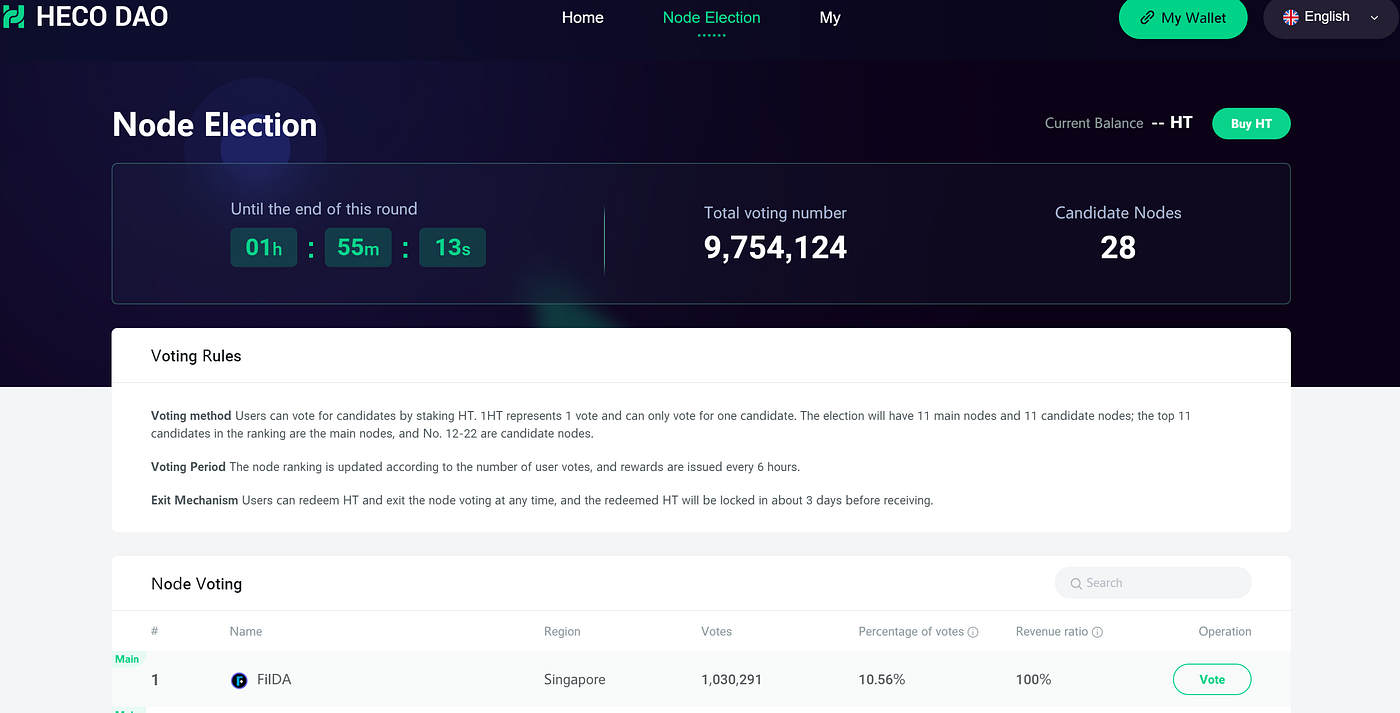
* FilDA is the top HECO elected node.
* 100% of FilDA HECO node revenue is currently awarded to voters.
* FilDA released the Bug Bounty plan.
* FilDA HECO node voting earned voters an airdrop.
# FilDA Finance Update - July 2021
A monthly report about news and development for FilDA: Secure your own wealth
### I: Project Statistics
* TVL: $191.63m
* Total Deposits & Loan: $306.36m
* Current $FilDA Supply: 79,935,576
* Market Cap: $10,899,599
* Current FilDA Liquidity Pools: 4 Pairs
* FilDA LP Staking:
* Current DAO Pool Total: 27.11m $FilDA
* HECO Node position: 1st
### II: Community Update
* Twitter: 22k followers
* Global (English) Telegram Group: 2,757 members
* WeChat (Chinese) groups: \~3650 members
### III: Development Update
* Third-party investment page now includes the Depth and Booster protocols to expand DeFi opportunities and improve the efficiency for users’ funds.
* In LuckyHeco activities, NFTs were issued and bonuses granted to overseas communities.
* Improved deposit exchange function: one-click conversion of deposit and debit positions.
* Optimized deposit exchange function: support the movement of funds without affecting the loan utilization rate.
### IV: Operational Dynamics
* Huobi ECO Chain reminder service provider WAU Finance has integrated the FilDA add-on. WAU.Finance informs users of liquidation dangers and profit opportunities through email and text message alerts. In addition,
* FilDA holders with 10,000+ FilDA in DAO get the [wau.finance](http://wau.finance/) VIP service for free.
* FilDA is the top HECO elected node.
* 100% of FilDA HECO node revenue is currently awarded to voters.
* FilDA released the Bug Bounty plan.
* FilDA HECO node voting earned voters an airdrop.

# FilDA Documentation
Technical and guidance information about the FilDA lending and borrowing protocol - a modified Compound fork.

Also find us on:
Twitter: [https://twitter.com/FilDAFinance](https://twitter.com/FilDAFinance?s=20)
Medium: [https://fildafinance.medium.com](https://fildafinance.medium.com/)
Telegram:
##
[下一个 - Technical DocsFilDA Platform Documentation](https://gregfilda.gitbook.io/filda-english-preview/v/chinese/technical-documents/filda-docs-english)最近更新 5天前此页面是否有帮助?
# FilDA Platform Documentation
FilDA contains two protocols: Banking (Lending and Borrowing) and Staking The banking (lending and borrowing) protocol is a revision based on Compound and the staking protocol is one based on Harvest.
## Introduction
FilDA is a lending and borrowing project basing on smart contracts to realise a cross-chain money market . It launched on HECO (Huobi ECO Chain) and is deployed on other public chains (IoTeX, Elastos Smart Chain, BNB Smart Chain, Polygon and Arbitrum One).
Unlike other lending and borrowing projects deployed on the Ethereum chain, we chose HECO as the base chain. We introduced the ecological resources and assets on Huobi and can make our service more user-friendly because of the accessibility of HECO and the extremely low gas fees. The same is true for the subsequent chain launches since our genesis on HECO.
**Note**
FILDA is the governance token of FilDA Protocol rather than a token with pure investment value.
The project team has 5 percent of the token share which will be released in blocks over 4 years. The team didn't receive any tokens in the first week after FilDA was launched. The token for the team was generated from the second week after FilDA went live.
### Business Model

#### Basic Features
* Liquidity pool
* Interest rates are determined algorithmically by supply and demand
* Floating interest rates that are non-negotiable
* Absolutely transparent token balance information, complete records of all transactions and historical interest rates
#### Deposit
* Aggregate the tokens of each user
* Withdraw the assets at any time
* Collect the accrued interest at any time
#### Primary Use Cases
* Uses can supply their asset and earn interest at low risk
* dApps, institutions and exchanges can gain incremental returns
#### Borrowing Tokens
* Requires over-collateralisation
* No time limit for borrowing
#### Risk
* When the value of the borrowing assets is above the collateral ratio, the users' collateral should be liquidated at a price that is below the market price, which motivates the arbitrageurs to step in to eliminate the risk.
#### Primary User Cases
* Quickly borrow utility tokens at any time without having to wait (time required to fill an token buy order on exchanges)
* Users can conduct ICO investments by borrowing ETH using their existing portfolio (multiple tokens or assets) as collateral.
* Short selling
#### Ledger System
Cash + Borrows = Supply + Equity
Follow international accounting standards:
| Event | Debit | Credit |
| ------------------------ | ------------------- | ------------------- |
| Supply Token | Cash | Supply |
| Withdraw Token | Supply | Cash |
| Borrow Token | Borrows | Cash |
| Repay borrows | Cash | Borrows |
| Liquidate (Borrower) | Supply (Collateral) | Borrows(Asset) |
| Liquidate ( Caller) | Cash(Asset) | Supply (Collateral) |
| Accrue Interest (Supply) | Equity | Supply |
| Accrue Interest (Loan) | Borrows | Equity |
[ ](https://gregfilda.gitbook.io/filda-english-preview/v/chinese/)
# fTokens
About fTokens, lending and borrowing
### What is fToken?
All assets on FilDA are integrated through a token contract which represents the HRC20 compatible account balance provided to the protocol. By minting fTokens, users can perform the following operations:
1. Users can earn interests through fToken's conversion rate
2. Users can use fToken as collateral.
fToken is the major way to interact with FilDA protocol. When users mint, redeem, borrow, repay, liquidate or forward fTokens, it will use fToken contracts to enable these operations.
### What is the exchange rate between fTokens and tokens?
The exchange rate between the original assets and fToken is not constant. fToken is more like a fund quota. The assets exchanged back from fToken may increase because of the interests. Generally, users can get a return of up to 50 times of the deposits in fToken. But the interest may also impact the amount of fToken.
### How to use fToken
Users will receive fXXX token after depositing their asset. Import these ftoken into your wallet to check the amount you hold.
### What are the risks in the use of fToken
fToken is a certificate of deposit. After an ftoken is transferred to other platforms, the deposit in the account decreases and the loan utilisation rate increases. Users need to verify their loan limit before they can participate in other platforms. Recently, prices have fluctuated sharply, and it is recommended to keep loan utilisation rates low, to avoid liquidation.
### Is the fToken deposited in FilDA and not given?
Those holding fTokens get FilDA income. If the HECO cooperative project supports fToken mining, FilDA will enter its contract and the cooperative project will make the secondary distribution rules.
### What are the currently used platforms for fToken?
FilDA will continue to develop partners. Supernova.cash currently supports the use of fTokens and can participate in mining. A group of partners will support fTokens in early March.
# Interest rate model
## Interest Rate Model
### APR, Nominal Interest Rate, Actual Interest Rate
Traditional financial platforms mostly use the day as the time unit. By comparison, Filda uses the block time (3 seconds) as the time unit.
The interest rate on traditional financial platforms is constant during the life cycle of a mortgage. However, the interest rate on FilDA fluctuates based on supply and demand. Both the borrowing interest rate and the supply interest rate might vary in different blocks. Therefore, FilDA's borrowing interest rate/ supply interest rate refers to the rate of each block.
In traditional financial platforms, the interest rate includes nominal interest rate and actual interest rate. Generally speaking, the interest rate that the borrower is informed of is the nominal interest rate, but the actual interest rate is used in accordance with the compound interest when calculating interest.
In FilDA:
Nominal interest rate = Actual interest rate
Annual percentage rate (APR) = interest rate \* blocks per year
Blocks Per Year = 10 512 000 = 60/3 \* 60 \* 24 \* 365
### Exchange Rate
When lenders deposit HUSD into the money market, it should convert HUSD into fHUSD based on the real-time exchange rate on the platform. This process is named Mint Token.
Lenders can terminate the loan at any time without waiting for the borrowed asset to be returned. When lenders take back their principals and redeem the interest, fUSD that the lenders hold is converted into HUSD based on the real-time exchange rate on the platform.
Where:
`exchangeRate = (totalCash + totalBorrows – totalReserves) / totalSupply`
And:
`totalCash: the amount of DAI that the lender has deposited into the protocol but has not been borrowed yet`
`totalBorrows: The amount of HUSD that the borrower should repay ( principle + interest)`
`totalReserves: The total amount of reserves on the platform (Part of the loan interest is retained as platform reserve)`
`totalSupply: The total amount of cDAI that the lenders can receive`
### Utilisation Rate
*`Ua`* `=` *`Borrowsa`* `/ (`*`Casha`* `+` *`Borrowsa`*`)`
Utilisation rate is a measure that reflects the efficiency of the assets on the platform. That is the percentage of loans in the entire asset pool of the money market.
*`BorrowingInterestRatea`* `= 2.0% +` *`Ua`* `∗ 10%`
*`SupplyInterestRatea`* `=` *`BorrowingInterestRatea`* `∗` *`Ua`* `∗ (1−`*`S`*`)`
Where 2.0% is the base interest rate and 10% is the multiple factor.
The borrowing interest rate will be dynamically adjusted according to the utilisation rate. S is the pumping ratio of the FilDA platform. For different assets, these interest rate models can be adjusted and configured.
### Reserves
In traditional finance, the risk reserve should be derived from the interest income of each loan for any bank/p2p lending.
Comparatively, the reserve is also derived from the interest income of each loan based on the specific reserve factor on FilDA.
That is: `totalReservesNew = interestAccumulated * reserveFactor + totalReserves`
### Borrow Rate
There are two versions of borrow rate on FilDA. Version 1.0 is a linear interest rate model and Version 2.0 is a segmented interest rate model. Version 1.0 is actually a special case of version 2.0.
#### Version 2.0:
Here is the logic for Version 2.0: When the utilisation rate exceeds Kink, segmented interest model will be applied; otherwise, Version 1.0 is applied.
**Currently FilDA adopts a segmented interest rate for HFIL**
When utilisationRate <= kink
*`BorrowRate=BaseRate+UtilisationRate∗Multiplier`*
When utilisationRate >= kink
*`BorrowRate=BaseRate+UtilisationRate∗Multiplier+(UtilisationRate−Kink)∗JumpMultiplier`*
(Kink can be understood as the marginal interest rate, utilisationRate-kink can be understood as the overflow interest rate.)
**The above formula can be translated as:**
When utilisation rate <= marginal interest rate: Borrowing interest rate = base interest rate + utilisation rate \* utilisation rate multiplier
When utilisation rate > marginal interest rate: Borrowing interest rate = base interest rate + utilisation rate \* utilisation rate multiplier + marginal interest rate \* marginal interest rate multiplier
Where baseRate = The base interest rate.
# Implementation Principle
### A ledger with real-time transaction settlement
This is a ledger that can settle the transactions in real-time using smart contracts. The premise of the real-time settlement of the transactions in the ledger is that the transactions are carried out one by one in a specific processing sequence and reliable transaction time. Blockchain meets these requirements and provides a basis for automatic transaction settlement.
When a transaction occurs, the ledger settles the transaction for the corresponding account and updates the interest into the account balance. When the next transaction occurs, the same process is triggered again to update the account balance.
### Interest Model
A simple banking model is used to generate income from loans, which is used as the interest for deposit users. It doesn't offer floating loan interest or consider profits, but ensures the balance of borrowing and lending.
```
Loan Profit = Deposit InterestLoan Profit = Total loan * Loan interest rate * TimeDeposit Interest = Total deposit * Deposit interest rate * Time=>Total deposit * Deposit interest rate * Time =Total loan * Loan interest rate * Time=>Total deposit * Deposit interest rate =Total loan * Loan interest rate
```
According to the above equation,
1. When the loan is 0, no profit will be generated and then deposit interest is 0.
2. When the total loan increases, the profit will increase and then deposit interest will increase.
3. When the total loan remains unchanged and the total deposit increases, the deposit interest will decrease
Conclusion: The deposit interest rates change with changes in total loans and total deposits.
### Changes in the ledger
Here are 4 different transaction events: deposit, withdraw, borrow, repay.
If there are no transaction events, the total amount of deposits and loans will not change and interest rates will remain unchanged during this period. If any transaction events occur, the total amount of deposits and loans will change, and then the interest rate will also change.
Assuming that the borrowing interest rate is 0.05, the circles in the diagram below indicate the status of the ledger and interest rates, and the arrows indicate transaction events:

Circle a: Deposit is 100. Loan is 0. Loan interest rate is 5%. No interest earned.
**Transaction 1: borrow 50**
```
= (50 * 0.05)/ 100 = 0.025Deposit interest rate = ( total loan * loan interest rate)/ total deposit = (50 * 0.05)/ 100 = 0.025
```
The ledger resulted from event 2 and 3 can also be calculated according to the above equation.
Conclusion: Transaction events result in changes in interest rates
### Relationship between income and time
The status change as showed above doesn't include transaction settlement. In fact, incomes (interests) will be generated over time.
**For deposits:**
`New total deposit = total deposit + (total deposit * deposit interest rate * time)`
**For loans:**
`New total loan = total loan + (total loan * loan interest rate * time)`
Assuming that the loan interest rate is 5% (an usurious loan is used just for easy calculation), the settlement with time value should be as follows:
Yellow arrows represent the duration of the previous status. After a new event occurs, the status will be updated into the next time period.
As shown in the above diagram, the changes in interest rates become more complex after considering the relationship between income and time, but this calculation is still very clear.
*Status a* lasts 1 day. Since the loan is 0 and the interest rate is 0, the deposit doesn't change after settlement for *event 1*. But the total loan increases after *event 1*. The deposit interest rate is updated to 0.025 after *event 1*.
*Status b* lasts 2 days until *event 2* occurs. Here is the calculation of the new total deposit and total loan before settlement for e*vent 2*:
**## Settlement ##**
`New total deposit = 100 +(100 * 0.025 * 2)= 105`
`New total loan = 50 +(50 * 0.05 * 2) = 55`
After settlement for *event 2*, the total deposit will be 105 + 50 = 155.
According to the new deposit of 155 and the new loan of 55, the new interest rate is 0.01774.
*Status c* lasts 1 day until *event 3* occurs.
**## Settlement ##**
`New total deposit = 155 +(155 * 0.01774 * 1) = 157.75`
`New total loan = 55 + (55 * 0.05 * 1) = 57.75`
Because 20 is repaid, total loan changes to `57.75 - 20 = 37.75`
Then the new interest rate is `0.012`.
Conclusion: The settlement is conducted when any transaction events occur. After settlement, the account balance will be adjusted, which leads to a change in the interest rate.
### Each Itemised account
The calculation as discussed above is complicated, but it is clear that the status change is triggered by events. In reality, the total amount of deposits and borrowings is generated by the aggregation of countless accounts rather than one single account. For example, Alice deposits 50, Bob deposits 30, and the total deposit is 80. Because Alice and Bob deposit at different times, their interest rates are different. All these factors bring more complexity to the process. The same goes for borrowing. Therefore, each account must be settled separately, and their interest rates vary according to changes in the general ledger quota.
We classify the total deposit 100 in *status a* as other deposits. After 2 days, Alice deposits 50, and other deposits are updated to 105 after settlement. Alice's deposit increases the total deposits to 155, and the new deposit interest rate is updated to be 0.01774.
One day later, Bob also deposits 50. By the time before Bob's event, the settlement for Alice's deposit and other deposits uses the interest rate of 0.01774.This calculation results are shown in *status c*.
As analysed above, we can find that every account balance needs to be settled when an event occurs, . In this way, as the number of deposit/borrowing users increases, there will be more and more accounts, and the calculation workload for each settlement will also increase. In fact, it is not necessary to settle all the accounts as long as the historical interest rate is recorded. We can directly calculate the state c as shown in the diagram above based on the initial status of each account:
`Other Deposits = 100 +(100 * 0.025 * 2)+((100 +(100 * 0.025 * 2))* 0.01774 * 1)`
`Alice's deposit = 50 + (50 * 0.01774 * 1)`
`Bob's deposit = 50`
Where 100 is the initial amount of other deposits, and 50 is the initial amount of Alice's deposit. 0.025 is the interest rate for the first period, and 0.01774 is the interest rate for the second period. It can be found that as long as there is a record of historical interest rates, the balance of each account can be calculated through iterative computation. Therefore, when the settlement is performed, only the account of the event needs to be settled, and other accounts can be temporarily not settled until any events apply to them.
Conclusions: Each settlement is only for accounts whose balances are affected and the general ledger is updated. There is no need to settle other accounts before new events occur.
This part of the description is compiled from the Internet, thanks to the original author, outprog.
Link:
---
[Next Page](/llms-full.txt/1)


.png?alt=media&token=03ace46c-d2bf-45e5-8171-abb708a2db73)


.png?alt=media&token=a326f71d-7aec-45d0-8a50-e610cccdff1d)
.png?alt=media&token=7e7bc530-2942-450e-a788-19444c503734)